
Jobs and VMs
Three modes
Section titled “Three modes”Every VM has a mode, chosen when it is created:
| Mode | What runs | When the main command ends | Typical use |
|---|---|---|---|
job |
One command | The VM stops and is removed automatically | Builds, tests, one-off tasks |
service |
The image’s command, or one you give | The VM stops; its disk and definition are kept | A web server or daemon |
environment |
Nothing by default; you use koala exec |
Nothing: it has no main command | A development box |
Service and environment VMs are persistent: they keep their disk across stops and starts until you remove them. Closing your terminal never stops a VM.
Disposable jobs: koala run
Section titled “Disposable jobs: koala run”koala run --image docker.io/library/alpine:3 -- /bin/sh -c 'echo building; exit 3'echo $? # 3Options:
| Option | Meaning |
|---|---|
--image REF |
The image (required). |
--timeout S |
Kill the command after S seconds (1 to 86400). Exit status 124. |
--cpus N, --memory MiB, --disk MiB |
Resources. Defaults for run: 1 vCPU, 512 MiB RAM, 1024 MiB disk. |
-i |
Send your stdin to the command. |
-t |
Give the command a terminal. Use -it for an interactive program. |
--detach |
Print the job’s IDs and return at once; the job keeps running. |
--result-file PATH |
Write the result as JSON (mode 0600). |
--json |
With --detach or --result-file only: print JSON on stdout. |
--rm is accepted for familiarity and changes nothing: a job’s VM is
always removed after it stops.
While attached, Ctrl-C cancels the job (exit status 130). A detached job is
picked up again with koala attach:
koala run --detach --json --image docker.io/library/alpine:3 -- /bin/sh -c 'sleep 5; echo done'# prints {"executionId": "...", "vmId": "...", "runId": "...", ...}koala attach --no-stdin EXECUTION_IDThe VM’s ID is useful while the job runs, for example to copy files in and out. Exit statuses are listed in working inside a VM.
Persistent VMs from flags: koala create NAME
Section titled “Persistent VMs from flags: koala create NAME”koala volume create data --size 256MiB --waitkoala create box --image docker.io/library/alpine:3 --cpus 1 --memory 512 --disk 1024 \ --publish 8080:8080 --volume data:/data --mount "$PWD:/workspace" --waitkoala start box --wait| Option | Meaning |
|---|---|
--image REF |
An OCI image. |
--catalog NAME (or --image catalog:NAME) |
A Koala catalog entry (see profiles). |
--mode job|service|environment |
Default: environment. |
--profile lean|full |
Default: lean for an OCI image; a catalog entry chooses its own. |
--cpus N, --memory MiB, --disk MiB |
Resources. See below. |
--publish [ADDR:]HOSTPORT:GUESTPORT[/tcp|/udp] |
Publish a port (networking). Repeatable. |
--volume NAME:/guest/path[:ro|:rw] |
Attach a named volume, read-write by default (storage). Repeatable. |
--mount /host/dir:/guest/path[:ro|:rw] |
Share a host directory, read-only by default (storage). Repeatable. |
-- ARG... |
After everything else: the process’s arguments, replacing the image’s command. |
--entrypoint PATH |
Replace the image’s entrypoint. |
--env KEY=VALUE |
An environment variable for the process. Repeatable. |
--user U, --workdir DIR |
The process’s user (a name or UID[:GID]) and starting directory. Default: the image’s. |
--no-internet |
No internet access. Grants and published ports still work. |
--broker GRANT=POLICY |
Reach a broker policy at GRANT.broker.koala.internal. Repeatable. |
--host-service ADDR:PORT[,PORT...][/tcp|/udp] |
Reach a service on your Mac (networking). Repeatable. |
--secret-env NAME=VARIABLE, --secret-file NAME=/guest/path |
Give a stored secret as a variable or a file. Repeatable. |
Before submitting, create prints on stderr everything the VM will be
able to reach: internet on or off, each grant, port, volume, share and
secret. So you can see what you are granting.
VM names start with a lower-case letter, then use lower-case letters,
digits and - (at most 63 characters).
For example, a service that runs sleep 3600, with no internet and one
broker grant:
koala create svc --image docker.io/library/alpine:3 --mode service \ --no-internet --broker ai=openai-main --wait -- sleep 3600LAN grants, labels, a terminal and a process timeout need a spec file.
Persistent VMs from a template: koala create --template
Section titled “Persistent VMs from a template: koala create --template”For an agent such as Hermes, a VM template makes the VM, its broker policies and volumes, and its setup inside the VM, in one command:
koala create hermes --template hermesPersistent VMs from a spec file: koala create -f
Section titled “Persistent VMs from a spec file: koala create -f”A spec file is JSON. Example web.json, a busybox web server that serves a
read-only host directory and keeps data in a named volume:
{"apiVersion": "koala.dev/v1alpha1", "kind": "VirtualMachine", "spec": { "name": "web", "mode": "service", "profile": "lean", "image": {"kind": "oci", "reference": "docker.io/library/busybox:latest", "platform": "linux/arm64"}, "resources": {"vcpus": 1, "memoryMiB": 512, "diskMiB": 1024}, "process": {"arguments": ["/bin/busybox", "httpd", "-f", "-p", "8080", "-h", "/srv"]}, "network": {"internet": false, "allow": [], "publish": [{"protocol": "tcp", "hostAddress": "127.0.0.1", "hostPort": 0, "guestPort": 8080}]}, "shares": [{"source": "/Users/me/site", "destination": "/srv", "readOnly": true}], "volumes": [{"name": "site-data", "destination": "/data", "readOnly": false}], "secrets": []}}koala config validate -f web.json # checks the file without creating anythingkoala volume create site-data --size 256MiB --waitkoala create -f web.json --waitkoala start web --waitThe fields, briefly:
| Field | Notes |
|---|---|
name, mode, image |
Required. image.platform is linux/arm64. |
profile |
lean or full. |
resources |
All three of vcpus (1–32), memoryMiB (128–131072), diskMiB (256–1048576), or omit it for the profile’s defaults. |
process |
entrypoint, arguments, environment, workingDirectory, user, terminal, timeoutSeconds. Omitted fields use the image’s defaults. |
network |
internet, allow (grants), publish. See networking. |
shares, volumes |
See storage. readOnly is required on each entry. |
secrets |
Named secret grants. See secrets. |
labels |
Your own key/value notes. |
Rules worth knowing:
- Unknown fields, duplicate keys and wrong types are refused, with a
pointer to the problem, for example
/spec/network/allow/0/ports. - Nothing is expanded: no environment variables,
~or shell syntax. Host paths must be absolute. -f -reads the file from stdin.- With
-f, the--publish,--volumeand--mountflags are refused: put them in the file.
Resources and defaults
Section titled “Resources and defaults”| How the VM is made | vCPUs | RAM | Disk |
|---|---|---|---|
koala run without resource flags |
1 | 512 MiB | 1024 MiB |
create or a spec file without resources, lean |
1 | 256 MiB | 1024 MiB |
create or a spec file without resources, full |
2 | 1024 MiB | 8192 MiB |
create with some resource flags |
Missing values become 1 vCPU, 512 MiB, 1024 MiB |
What these numbers mean for your Mac is explained in limits.
Lifecycle commands
Section titled “Lifecycle commands”koala list # all VMs: ID, name, mode, state, spec generationkoala inspect VM # the VM in words: state, image, command, network, storagekoala inspect --json VM # everything, as JSONkoala start VM --waitkoala stop VM --wait # returns once the VM has really stoppedkoala rm VM --wait # removes a stopped VM; named volumes are keptkoala stats VM # the memory and disk the manager reserved for itHow koala stop stops a lean VM:
- It sends SIGTERM to the VM’s command, and to any
koala execcommand still running. - It waits up to 10 seconds for them to exit.
- It stops the VM, ending whatever is left.
So a service can save its work and exit cleanly. If your command is a shell
script that starts other programs, have it pass the signal on (trap), so
they can close too.
For example, a service VM that failed to start:
hermes (8f6d5663-ce25-473e-be8f-3f568c385aa2) state Failed: GRANT_REQUIRED at 2026-10-13 17:26:15 JST mode service, lean profile image docker.io/nousresearch/hermes-agent:latest arm64 digest sha256:1697e5df232a… resources 2 vCPUs, 2 GiB memory, 6 GiB disk command the image's entrypoint, with: gateway run user the image's env API_SERVER_ENABLED=true API_SERVER_HOST=0.0.0.0 internet off grants broker openai -> policy hermes-openai (openai.broker.koala.internal) published 127.0.0.1:8642 -> 8642/tcp (loopback), not listening volumes hermes-data at /opt/data, read-write shares none secrets none run none spec generation 3; cleanup: retain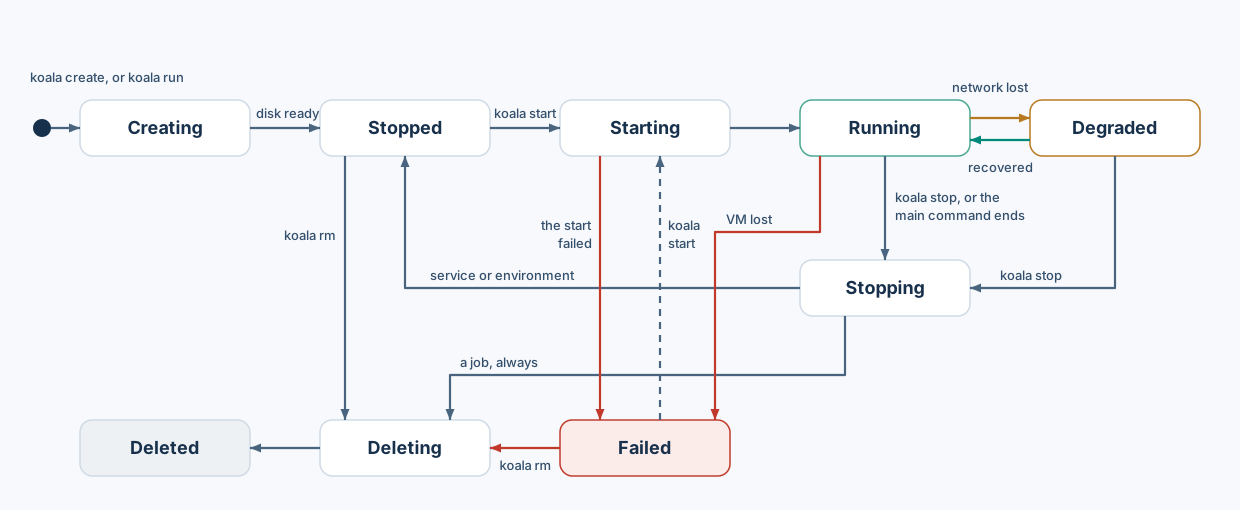
koala run goes through the same states without stopping at Stopped.
A job is removed whether its command succeeds or fails; a service or
environment VM keeps its disk until koala rm.
VM states you will see: Creating, Stopped, Starting, Running,
Degraded (running, but its network was lost and couldn’t be rebuilt;
see networking), Stopping,
TerminationUnknown, Failed, Deleting, Deleted.
koala stats shows the reservations the manager made for the running VM.
Usage figures from inside the guest are not available yet.
Change a VM: koala update
Section titled “Change a VM: koala update”You change a persistent VM by replacing its spec while it is stopped. The
change applies at the next start. The simplest way is koala edit:
koala stop web --waitkoala edit web --wait # opens the spec in your editor; prints the new grants, then applies themkoala start web --waitkoala editopens the VM’s current spec in$VISUALor$EDITOR(viif neither is set). When you save and quit, it checks the file and applies it. It says “no change” if nothing changed.- If the edit is not valid, or cannot be applied,
koala editkeeps your file and tells you where it is, so you can fix it and apply it withkoala update.
To work on the file yourself:
koala inspect --export web > web.json # the VM's current, fully resolved spec# edit web.jsonkoala update web -f web.json --wait # prints the new grants, then applies themeditandupdateon a running VM are refused.updatereplaces the whole spec with the file’s content, so start from a freshinspect --export.- The base image and the profile cannot be changed. Create a new VM instead.
- The exported file contains host paths. Check them before using it on another Mac.
Runtime updates
Section titled “Runtime updates”koala runtime update VM --bundle DIGEST [--rollback] selects a different
verified kernel and init bundle for a stopped VM, without touching its
image or disk. Runtime bundles beyond the preview’s lean runtime come with
the catalog, which is not available yet.