
Profiles: lean and full
Every VM has a profile, fixed when it is created.
| Lean | Full | |
|---|---|---|
| What boots | Koala’s small init, then your image’s command | systemd, with Koala’s agent as a service |
| Image source | Any linux/arm64 OCI image |
A Koala catalog entry |
systemctl, journalctl |
Not available | Available |
| Docker Engine | No | Yes (Docker and containerd) |
| Default resources | 1 vCPU, 256 MiB RAM, 1 GiB disk | 2 vCPUs, 1024 MiB RAM, 8 GiB disk |
| Good for | Jobs, single services, quick tools | Development boxes, Docker, multi-service setups |
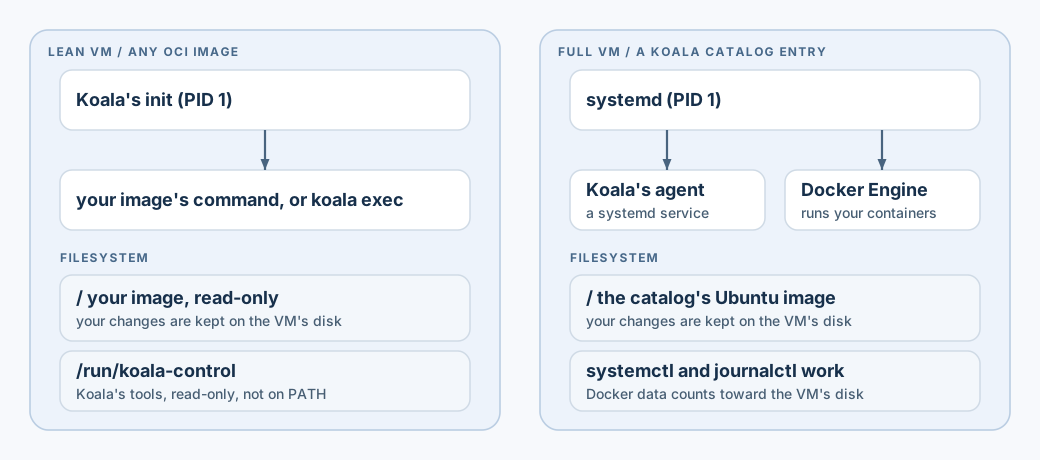
OCI images run in the lean profile, and catalog entries in the full profile.
Any other pairing, such as --profile full with an OCI image, fails with
IMAGE_INCOMPATIBLE. The profile of an existing VM cannot be changed.
Full VMs
Section titled “Full VMs”A full VM comes from a catalog entry:
koala volume create dev-data --size 1GiB --waitkoala create dev --catalog CATALOG_ENTRY --volume dev-data:/data --mount "$PWD/src:/src:ro" --waitkoala start dev --wait # returns once systemd and Docker are readyNot available yet: the signed Koala catalog, with its versioned full image, is not published; the preview has the lean runtime only. Until then there is no public catalog entry to use. The full profile was tested with a test catalog entry.
Commands run inside systemd’s environment, as root by default:
koala exec dev -- systemctl is-system-running --waitkoala exec dev -- systemctl is-active docker containerdkoala exec dev -- journalctl -u docker -n 20 --no-pagerkoala exec -it dev -- /bin/shDocker
Section titled “Docker”Docker Engine runs inside the full VM. You do not need Docker Desktop.
koala cp rootfs.tar dev:/tmp/rootfs.tarkoala exec dev -- docker import /tmp/rootfs.tar local/tool:1koala exec dev -- docker run --rm --network none local/tool:1 /bin/busybox echo okkoala exec dev -- docker run -d --name ticker --network none local/tool:1 /bin/busybox sleep 600What is tested:
importing an image and running containers with --network none, in the
foreground and detached. Pulling images from a registry inside the VM, and
container networking, are not part of the tested journey yet.
Things to know:
- Docker’s data is stored on the VM’s own disk and counts toward its
diskMiB. - Containers do not see Koala volumes or shares through
docker run -v /data:...: that path refers to the VM’s own/data, not the attached volume. - A tar file made on macOS may carry extended attributes that Docker
refuses (
com.apple.provenance). Create it withCOPYFILE_DISABLE=1 tar --no-xattrs --no-mac-metadata .... - In an interactive shell,
ttyprintsnot a tty. See interactive shells.
Lean VMs
Section titled “Lean VMs”The lean profile starts your image’s command directly; there is no service
manager. It is the default for OCI images and the profile koala run uses.
Use a service-mode VM for a long-running program, or an environment-mode VM
plus koala exec for ad-hoc commands. See jobs and VMs.
Inside a lean VM, the filesystem is your image’s: its files and programs are where the image puts them. What you change outside volumes and shares is kept on the VM’s disk, so it survives a stop and start of an environment or service VM. A job’s disk is removed with the job.
-
Koala’s own tools are mounted read-only at
/run/koala-control. They are not onPATH, and you don’t need to call them. -
koala execruns a program from the image. An image without a shell, such asscratchor a distroless image, can only run the programs it contains. -
Users: the image’s user, a spec’s
"user"and--usercan be names from the image’s own/etc/passwdand/etc/group:apptakes the user’s primary group, andapp:staffnames the group;- numeric IDs (
1000,1000:1000) work as before; rootworks even in an image without/etc/passwd;- a user added inside a running VM (with
useradd) is not seen.
Koala 0.1.0-preview.5 and earlier take numeric IDs only.
-
HOME: unless the image, the spec or the command sets it,HOMEis the user’s home directory from/etc/passwd:/rootfor root,/when there is none.