
Shares, volumes and disks
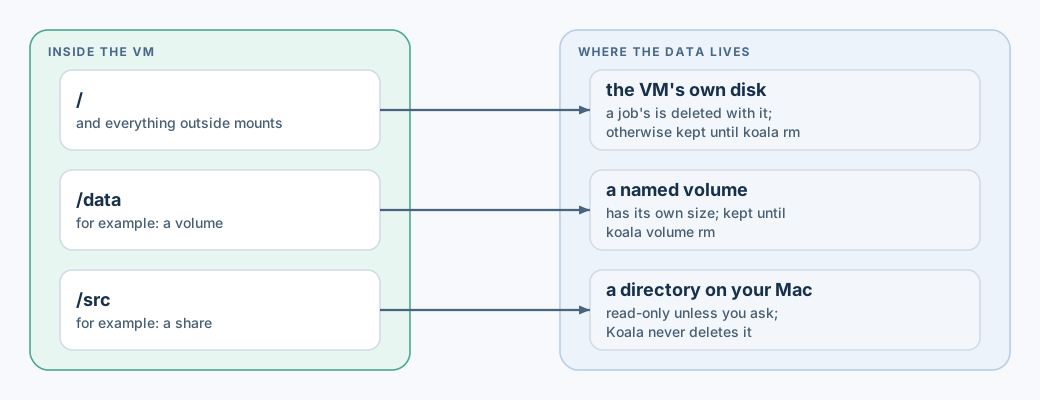
A VM can store data in three places:
| Where | What it is | Lifetime | Counted in diskMiB |
|---|---|---|---|
| The VM’s own disk | The image’s files plus everything the VM writes elsewhere | A job’s is deleted with it; a persistent VM’s lasts until koala rm |
Yes |
| A named volume | A separate disk you create and attach | Until you run koala volume rm |
No (it has its own size) |
| A host share | A directory on your Mac, shared into the VM | It is your directory; Koala never deletes it | No |
Share a host directory
Section titled “Share a host directory”koala create dev --image docker.io/library/alpine:3 --mount "$PWD/src:/src" --wait # read-onlykoala create dev2 --image docker.io/library/alpine:3 --mount "$PWD/out:/out:rw" --wait # read-writeIn a spec file:
"shares": [ {"source": "/Users/me/project/src", "destination": "/src", "readOnly": true}, {"source": "/Users/me/project/out", "destination": "/out", "readOnly": false}]- Shares are read-only unless you ask. A read-only share stays read-only whatever the guest does, even as root.
--mountresolves the host path for you. In a spec file, write the directory’s real path exactly as macOS stores it: absolute, no symlinks, no.., and the right upper/lower case.- The directory must be readable by you. A read-write share must also be owned by you, and not writable by your group or others.
- You cannot share a directory that contains Koala’s own state.
- Every start re-checks the directory. If it was renamed, replaced, made
a symlink, or changed owner or permissions, the start fails with
GRANT_REQUIRED. Koala never re-approves a share by itself: stop the VM, thenkoala updateit with the directory you mean.
Treat a writable share as untrusted output
Section titled “Treat a writable share as untrusted output”A read-write share lets the program in the VM create any file there,
including symlinks that point elsewhere on your Mac, such as ~/.ssh. Your
editor, build tools or backup software may later follow those links with
your permissions. So:
- Share source code read-only.
- Give write access only to a dedicated output directory.
- Check what the VM wrote before your tools act on it.
Named volumes
Section titled “Named volumes”A volume is a fixed-size disk that outlives the VMs that use it.
koala volume create data --size 1GiB --wait # 128 MiB to 1 TiB; a bare number means MiBkoala volume list # name, state, capacity, used, attachmentskoala create dev --image docker.io/library/alpine:3 --volume data:/data --waitkoala volume rm data --wait--volume NAME:/pathis read-write by default; add:rofor read-only.- A volume can be written by only one VM at a time.
koala rm VMnever removes its volumes. A new VM can attach the same volume and find the data unchanged.volume rmis refused while any VM refers to the volume, even a stopped one. Remove the VM first.- In a full VM, Docker containers do not see the volume through
docker run -v /data:.... See profiles.
Copy instead of share
Section titled “Copy instead of share”To move files without granting a directory, use
koala cp.
Disk sizes
Section titled “Disk sizes”diskMiB is the size of the VM’s own disk as the guest sees it. The file
on your Mac grows only as data is written. Volumes and shares are not
included. See limits for what happens when
your Mac runs low on space.