
Networking
Each VM has its own network stack. Koala checks every connection the guest makes on the Mac side, so software in the VM cannot switch the rules off.
The default: internet, and nothing local
Section titled “The default: internet, and nothing local”Without a network section, a VM:
- can reach the internet over TCP and UDP;
- cannot reach your Mac (including
127.0.0.1services), your LAN, private network ranges such as a VPN’s, or other Koala VMs; - publishes no ports.
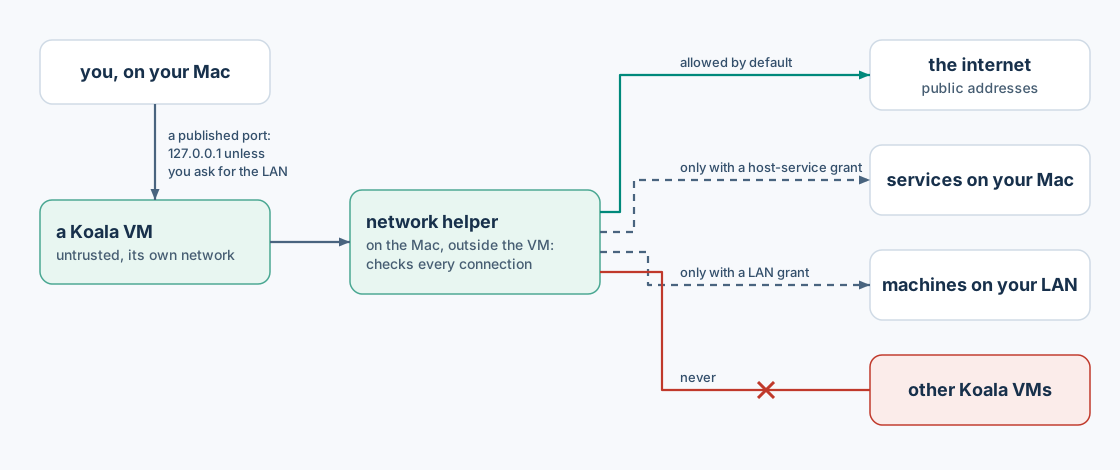
Internet means public addresses only. Addresses on your local networks and VPNs are treated as local, even if they look public, and stay blocked.
To switch the internet off, set it in the spec file:
"network": {"internet": false, "allow": [], "publish": []}Grants in allow still work when the internet is off. The VM can still
resolve the names of its granted host services.
Reach a service on your Mac
Section titled “Reach a service on your Mac”Grant one address and specific ports. For example, a service listening on
your Mac at 127.0.0.1:8080:
"network": {"internet": false, "allow": [ {"kind": "host-service", "address": "127.0.0.1", "protocol": "tcp", "ports": [8080]}], "publish": []}Inside the VM, use the name host-1.koala.internal:
koala exec agent -- /bin/sh -c 'wget -qO- http://host-1.koala.internal:8080/'- Each distinct host address in a spec gets the next name, in order:
host-1.koala.internal,host-2.koala.internal, and so on.koala inspect --json VMlists them undernetwork.aliases. addressis an IPv4 address such as127.0.0.1.protocolistcporudp. Up to 64 ports per grant.- Only the granted ports work. Other ports on the Mac, the Mac’s LAN address and the internet (when off) are refused.
Reach a machine on your LAN
Section titled “Reach a machine on your LAN”"allow": [{"kind": "lan", "cidr": "192.168.1.20/32", "protocol": "tcp", "ports": [443]}]cidris an IPv4 network written without host bits,/8or narrower. Prefer a single host (/32).- Loopback and other protected ranges cannot be granted.
- LAN grants create no
host-Nname: use the address.
LAN grants are covered by Koala’s network tests, but not by a CLI journey.
Publish a port
Section titled “Publish a port”Publishing lets programs on your Mac reach a port in the VM.
With create flags:
koala create box --image docker.io/library/alpine:3 --publish 8080:8080 --wait # 127.0.0.1:8080 -> guest 8080koala create box2 --image docker.io/library/alpine:3 --publish 0:8080 --wait # the Mac picks a free portkoala create box3 --image docker.io/library/alpine:3 --publish 5353:53/udp --waitIn a spec file:
"publish": [{"protocol": "tcp", "hostAddress": "127.0.0.1", "hostPort": 0, "guestPort": 8080}]-
Ports listen on
127.0.0.1by default: only programs on your Mac can connect.::1listens on the IPv6 loopback. -
To expose a port to your LAN, name another address. With flags,
--publish 0.0.0.0:8080:8080does this. In a file, the entry must also say"scope": "lan":{"protocol": "tcp", "hostAddress": "0.0.0.0", "hostPort": 8080, "guestPort": 8080, "scope": "lan"} -
hostPort0 lets the Mac choose a free port.koala inspect VMshows the port actually bound, while the VM runs:published 127.0.0.1:52144 -> 8080/tcp (loopback)While the VM is not running, the line ends with
not listening. -
If the port is already in use on the Mac, the start fails and nothing is left listening.
-
Publishing a port does not give the VM any outbound access.
Change a VM’s network
Section titled “Change a VM’s network”Network settings change only while the VM is stopped: export, edit,
update, start. See change a VM. To
revoke access immediately, stop the VM.
After a manager restart
Section titled “After a manager restart”If the manager restarts (or crashes) while a VM runs, the VM keeps running, and the restarted manager rebuilds its network within about 10 seconds:
- What comes back, with the same rules: internet access, host services, broker grants and published ports.
- Connections that were open at the time of the restart are lost, and apps must open new ones.
- Published ports keep their host port.
- Throughout,
exec,cp,logsandstatskeep working.
If the network can’t be rebuilt, for example because another program took one of the VM’s host ports in the meantime:
koala listshows the VMDegraded;- its network stays cut off, and its published ports are closed;
koala stop VM --waitthenkoala start VM --waitrestores it.
Wi-Fi, VPN and sleep
Section titled “Wi-Fi, VPN and sleep”Koala follows changes to your Mac’s network (Wi-Fi on or off, VPNs, route changes) and re-checks the rules. Connections that become disallowed are closed. Across a sleep, published ports pause and answer again after wake. This was tested on a real Mac with route, VPN, Wi-Fi and sleep changes.
Not available in v0.1
Section titled “Not available in v0.1”- Connections between VMs, and grants naming another VM.
- Changing a running VM’s network.
- IPv6 connections from the guest.