
Koala user guide
This guide matches Koala 0.1.0-preview.10. The latest release is on the releases page.
This guide is for macOS developers who use the koala command line. It
explains how to run jobs, services, development environments and AI agents
in Koala VMs.
Koala is in preview: 0.1.0-preview.10 is published, and v0.1 is in
development. This guide describes only what works today, and marks anything
that is planned but not built yet.
What Koala is
Section titled “What Koala is”Koala runs each of your Linux workloads in its own lightweight virtual machine on your Mac:
- One VM per environment. Each job, service or development environment gets its own ARM64 Linux VM, with its own kernel, disk and network stack. VMs do not share a network with each other.
- A CLI and a background manager. You type
koalacommands. A per-user manager (a launchd agent) keeps track of VMs and keeps them running after your terminal closes. Nosudois needed for everyday use. - Two guest profiles. Lean VMs run one OCI image (a Docker-style image) with a minimal init. Full VMs run a Linux distribution with systemd and Docker Engine.
- Agents with their keys on your Mac. An AI agent’s API keys can stay
in your login keychain: the broker adds a key only to the
requests a policy allows, so the key never enters the VM. A
VM template sets an agent up in one command, as in
koala create hermes --template hermes.
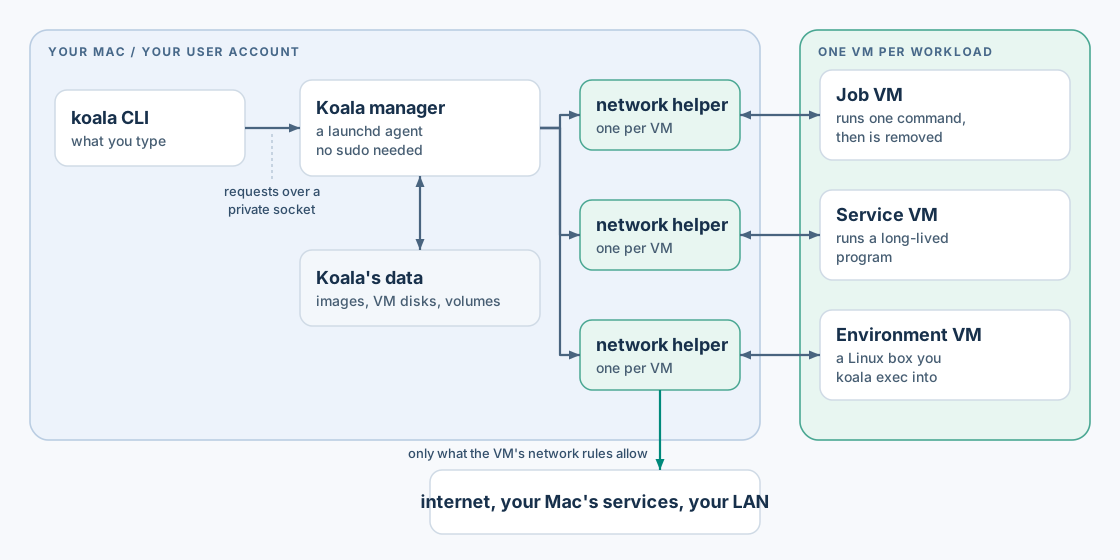
Each VM has its own kernel and disk, and a network helper on the Mac that checks every connection it makes.
What Koala promises, and what it does not
Section titled “What Koala promises, and what it does not”Koala gives a workload only the access you grant:
- No host files, except directories you share explicitly. Shares are read-only unless you ask for read-write.
- No secrets, unless you grant a named secret to that VM.
- Internet access by default, but no access to your Mac’s own services, your LAN or other VMs unless you grant it (internet can also be switched off).
- Published ports listen on
127.0.0.1unless you ask for the LAN.
The VM, its guest kernel and everything running inside it are treated as untrusted. Koala does not promise:
- To keep running after you log out of macOS, or across a reboot. See limits.
- To protect you from a compromised macOS, or from yourself: Koala trusts the logged-in user.
- That data the guest has already received can be taken back. Removing a secret or a share stops future access only.
- Dedicated CPU cores or a cap on total Mac memory use. See limits.
The adversarial-guest security testing is complete. Crash and endurance qualification, planned for release, is not finished yet.
Requirements
Section titled “Requirements”- A Mac with Apple silicon.
- macOS 26 or newer.
- Images for
linux/arm64. Intel (x86-64) images are not supported, and there is no Rosetta translation.
Contents
Section titled “Contents”- Getting started: install, start the manager, and run a first job and a first VM.
- Jobs and VMs: disposable jobs, persistent services and environments, VM spec files, and the VM lifecycle.
- Working inside a VM:
exec, terminals (-it),attach,cp, logs, the console, events and exit codes. - Images and private registries:
image pull,registry loginandlogout. - Secrets:
secret set, file and environment delivery, the login keychain and its approval prompt. - Keys on your Mac (the broker):
credential,policyand broker grants, so an agent’s API keys never enter its VM. - VM templates for agents:
koala create --template, an agent’s VM, keys, volumes and setup in one command. - Networking: internet access, host services, the LAN and published ports.
- Shares, volumes and disks: host directories, named volumes and disk sizes.
- Profiles: lean and full: systemd and Docker.
- Limits and behaviour: logout, sleep, restarts, memory and disk, and what is not available yet.
- Troubleshooting: error codes and what to do.
Examples
Section titled “Examples”- Run the Hermes agent: an AI agent’s gateway from its official image, as a service VM with internet off, its model key on your Mac, and its data on a volume.
- Run OpenClaw (not tested on Koala): the OpenClaw gateway from its official image, with one script, internet off and its model key on your Mac.
- An X agent: a normal browser in a VM that you sign in to through a live view, and an agent that reads X, drafts with a model (local Ollama or through the broker), and posts only what you approve.
Conventions in this guide
Section titled “Conventions in this guide”VMis a VM’s name or ID. A name must match exactly; if two VMs share a name, use the ID.- Upper-case words such as
EXECUTION_IDorREGISTRYare placeholders. - Commands that change something accept
--wait, so they return only when the change is finished. The examples use it. Without--wait, the command returns as soon as the manager has accepted the request. --jsonprints machine-readable output on stdout. Messages go to stderr.