Real-Time AI Editorial Workflows in Go: Loop, Revise, Publish with AgenticGoKit

Picture this: You ask for a bedtime story. A Writer agent drafts it in seconds—intentionally making a few typos. An Editor agent reads it, spots “tyme” instead of “time,” and fires back with corrections. The Writer fixes the issues and resubmits. The Editor approves. A Publisher agent then polishes everything into a beautiful final piece.
All of this happens automatically, and you watch it unfold in real-time.
This isn’t science fiction—it’s what you can build in an afternoon with AgenticGoKit, a pure Go framework for orchestrating multi-agent AI workflows. No Python required. No heavyweight dependencies. Just clean, idiomatic Go that lets you compose AI agents like LEGO bricks.
Why Golang developers will love this
If you’ve been envious of Python’s AI ecosystem, here’s your revenge:
- Native Go: No wrappers, no Python subprocesses. Pure, compiled Go performance.
- Channels everywhere: Streaming responses feel natural when your language was built for concurrency.
- Type safety: Your agents are strongly typed. Your workflow graph catches errors at compile time.
- Deploy anywhere: Single binary. No pip dependencies breaking in production. Ship it as a container, a Lambda, or bare metal.
The best part? The code actually makes sense. No magic decorators or hidden state—just explicit agent definitions and workflow composition.
The demo: A mini creative studio in ~200 lines
Here’s what the story-writer-chat-v2 example does:
- Writer Agent drafts a story (we seed a couple typos to make the loop visible)
- Editor Agent reviews and responds with either:
FIX: tyme→time, happyness→happinessAPPROVED: [story text]
- Loop continues until approved (configurable max iterations; the example uses 3)
- Publisher Agent formats the final story with title and clean paragraphs
What you see in the UI:
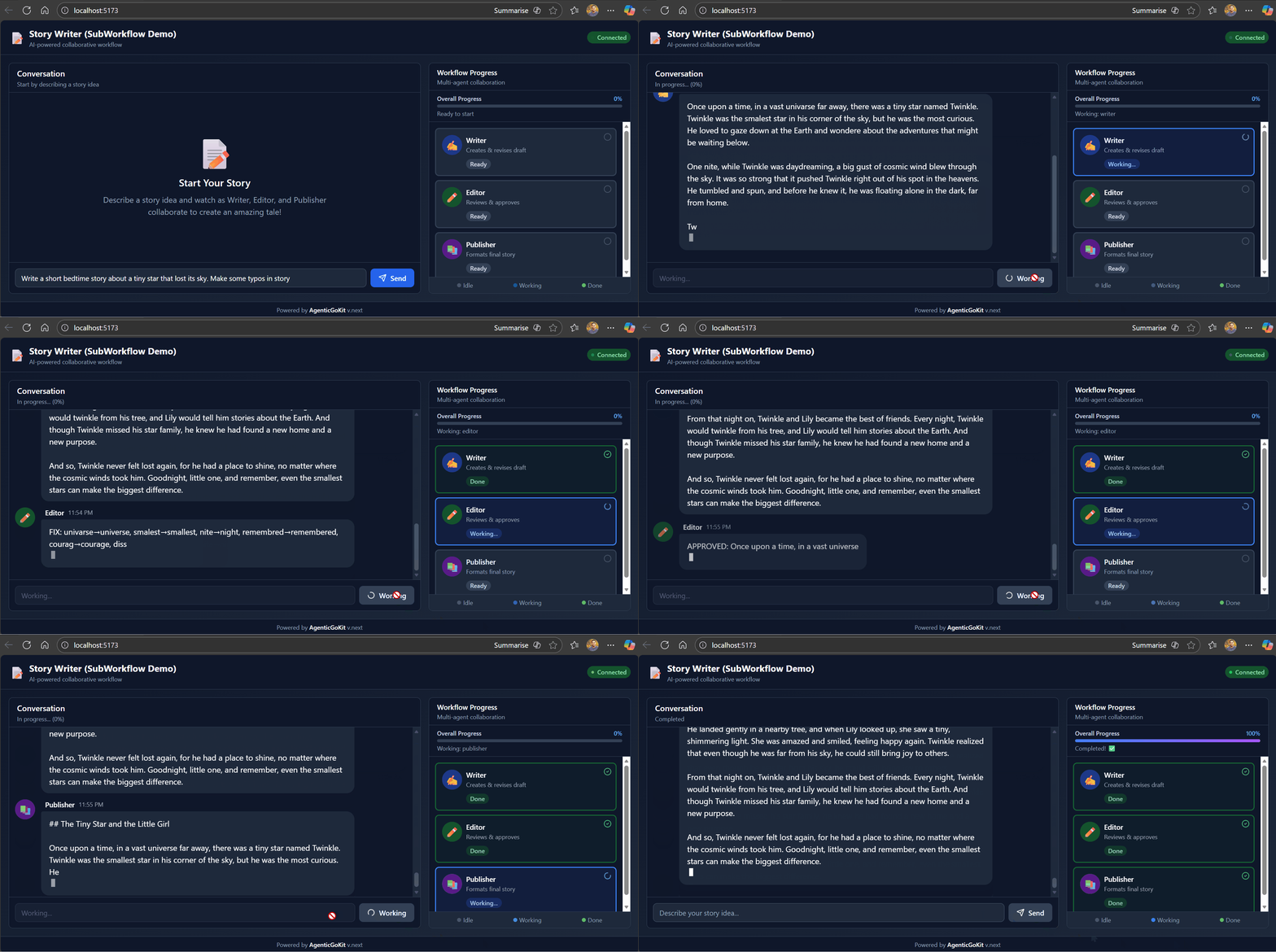
Agents “talk” to each other through streaming messages. It feels alive because the UI updates as each chunk arrives—just like watching ChatGPT type.
Under the hood: How AgenticGoKit makes this trivial
1. Agents are just functions with personality
// Example agent creation (match the demo's shape in `workflow/agents.go`)
writer, _ := vnext.QuickChatAgentWithConfig("Writer", &vnext.Config{
    Name:         "writer",
    SystemPrompt: WriterSystemPrompt,
    Timeout:      90 * time.Second,
    Streaming:    &vnext.StreamingConfig{Enabled: true, BufferSize: 50, FlushInterval: 50},
    LLM: vnext.LLMConfig{
        Provider:    cfg.Provider,
        Model:       cfg.Model,
        Temperature: 0.8,
        MaxTokens:   500,
        APIKey:      cfg.APIKey,
    },
})
That’s it. An agent is an LLM + config + optional memory. No inheritance hierarchies.
2. Loops are first-class workflows
loopWorkflow, _ := vnext.NewLoopWorkflowWithCondition(&vnext.WorkflowConfig{
    Mode:          vnext.Loop,
    Timeout:       300 * time.Second,
    MaxIterations: 3,
}, vnext.Conditions.OutputContains("APPROVED"))

loopWorkflow.AddStep(vnext.WorkflowStep{Name: "write", Agent: writer})
loopWorkflow.AddStep(vnext.WorkflowStep{Name: "edit", Agent: editor})
The framework handles the cycling. You just define the exit condition.
3. Workflows compose into bigger workflows
// Wrap the loop as a single agent
revisionLoop := vnext.NewSubWorkflowAgent("revision_loop", loopWorkflow, ...)

// Build the main pipeline
mainWorkflow.AddStep(vnext.WorkflowStep{Name: "revisions", Agent: revisionLoop})
mainWorkflow.AddStep(vnext.WorkflowStep{Name: "publish", Agent: publisher})

// Run it with streaming
stream, _ := storyPipeline.RunStream(ctx, userPrompt)
for chunk := range stream.Chunks() {
    // Handle start/text/complete/metadata/error
}
Nesting workflows is trivial—they’re just agents with extra steps. This is how you build complex orchestrations without losing your mind.
4. Transforms enforce contracts
vnext.WorkflowStep{
    Name:  "edit",
    Agent: editor,
    // In the demo transforms are simple string->string helpers (see `workflow/transforms.go`).
    Transform: func(input string) string {
        return fmt.Sprintf(`Review this draft. Output either:
- FIX: word1→correction1, word2→correction2
- APPROVED: [story text]
Draft: %s`, input)
    },
}
Transforms let you massage inputs/outputs between steps. The Editor always gets instructions—the Writer never sees them. Clean separation of concerns.
The visual flow
flowchart TD
    U[User Prompt] --> SP[Story Pipeline]
    SP --> RL[Revision Loop]

    subgraph RevisionLoop[Writer ↔ Editor Loop]
        direction TB
        W[Writer<br/>drafts story] --> E[Editor<br/>reviews draft]
        E -- FIX: typos --> W
        E -- APPROVED --> OUT[Exit Loop]
    end

    RL --> P[Publisher<br/>formats final story]
    P --> FINAL[Beautiful Story ✨]

    style RevisionLoop fill:#f0f0ff
    style W fill:#ffe0e0
    style E fill:#e0f0ff
    style P fill:#e0ffe0
Real-time streaming: The secret sauce
The demo includes a WebSocket server that converts agent events into UI updates:
// Example (illustrative) stream handler that matches how the demo emits chunks.
type StreamHandler struct {
    wsConn *websocket.Conn
}

func (h *StreamHandler) OnChunk(chunk *vnext.StreamChunk) {
    switch chunk.Type {
    case vnext.ChunkTypeAgentStart:
        h.wsConn.WriteJSON(map[string]interface{}{"type": "agent_start", "agent": chunk.Metadata["step_name"]})
    case vnext.ChunkTypeText, vnext.ChunkTypeDelta:
        text := chunk.Content
        if chunk.Type == vnext.ChunkTypeDelta {
            text = chunk.Delta
        }
        h.wsConn.WriteJSON(map[string]interface{}{"type": "agent_chunk", "agent": chunk.Metadata["step_name"], "text": text})
    case vnext.ChunkTypeAgentComplete:
        h.wsConn.WriteJSON(map[string]interface{}{"type": "agent_complete", "agent": chunk.Metadata["step_name"], "metadata": chunk.Metadata})
    case vnext.ChunkTypeMetadata:
        h.wsConn.WriteJSON(map[string]interface{}{"type": "workflow_info", "meta": chunk.Metadata})
    case vnext.ChunkTypeError:
        h.wsConn.WriteJSON(map[string]interface{}{"type": "error", "error": chunk.Error.Error()})
    }
}
The frontend renders these as progressive chat messages. Users see agents “thinking” in real-time. It’s the UX polish that makes AI feel magical.
Run it yourself in 60 seconds
git clone https://github.com/AgenticGoKit/agentic-examples
cd agentic-examples\story-writer-chat-v2

# Copy example env and edit it to match your provider
Copy-Item .env.example .env
# Edit `.env`: set `LLM_PROVIDER` and the matching API key variable.
# Examples:
#  - For OpenRouter: set `LLM_PROVIDER=openrouter` and `OPENROUTER_API_KEY=your-key`
#  - For OpenAI direct: set `LLM_PROVIDER=openai` and `OPENAI_API_KEY=your-key`

# Start backend
go mod tidy
go run main.go  # Runs on :8080

# In another terminal, start frontend
cd frontend
npm install
npm run dev  # Opens http://localhost:5173
Type: “Write a short bedtime story about a tiny star that lost its sky.”
Watch the Writer draft, the Editor critique, and the Publisher polish. It takes ~10 seconds.
Extend it in 5 minutes: Real ideas that work
Idea 1: Human-in-the-loop approval
// Pause before publishing, wait for user confirmation
mainWorkflow.AddStep(vnext.WorkflowStep{
    Name:  "human_approval",
    Agent: humanApprovalAgent,  // Blocks until webhook/button press
})
Idea 2: Add a tone coach
toneCoach := vnext.QuickChatAgentWithConfig("tone_coach", llm, vnext.ChatConfig{
    SystemPrompt: "Rate tone (1-5). If < 4, suggest improvements.",
})
loopWorkflow.AddStep(vnext.WorkflowStep{Name: "tone_check", Agent: toneCoach})
Idea 3: Parallel fact-checking
parallelWorkflow := vnext.NewParallelWorkflow(cfg)
parallelWorkflow.AddStep(vnext.WorkflowStep{Name: "spell_check", Agent: spellChecker})
parallelWorkflow.AddStep(vnext.WorkflowStep{Name: "fact_check", Agent: factChecker})
All of these are ~10 lines of code. Seriously.
Why AgenticGoKit exists
Python has LangChain and CrewAI. But if you’re a Go shop:
- You’re not rewriting your infra in Python just for AI workflows
- You want proper testing, not notebooks that break in production
- You need to deploy to Lambda/Cloud Run/K8s without containerizing Python runtimes
- You value explicitness over magic
AgenticGoKit gives you the good parts of agentic frameworks (composition, streaming, memory) without the Python tax.
Why you should try
If you’re building:
- Content pipelines: Automate drafts, reviews, SEO optimization
- Customer support: Route → classify → respond → escalate workflows
- Data processing: Extract → validate → transform → summarize chains
- Code review bots: Analyze → suggest → apply → test loops
…you need orchestration that’s transparent, debuggable, and fast. AgenticGoKit delivers.
The story-writer demo is intentionally simple—it shows the core pattern without drowning you in complexity. Once you grok Writer ↔ Editor loops, you can build anything.
Get started
- GitHub: AgenticGoKit/agentic-examples
- Docs: https://docs.agenticgokit.com/
- Discord: Join our community
Clone the repo. Run the demo. Break it. Build something weird.
Then show us what you made—we love seeing creative hacks. 🚀
P.S. If you build a story-writer that uses an LLM to argue about serial commas, please tag us. We need to see this.