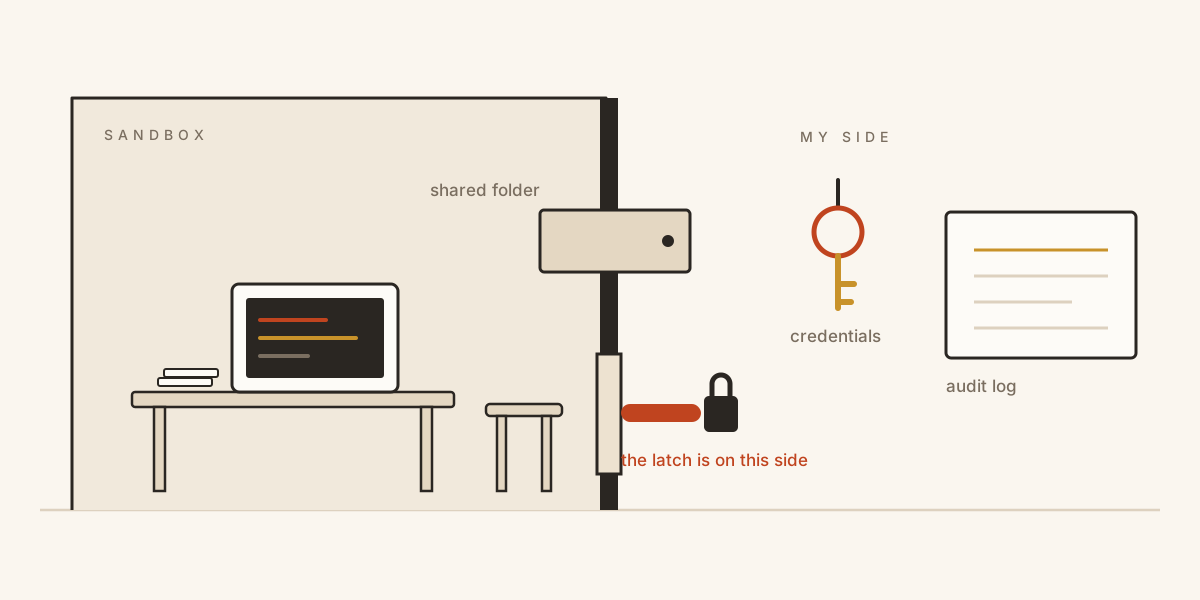
The desk is inside. The latch and the keys stay outside. That asymmetry is the entire design.

An autonomous agent, the kind we now hand real work to, can open a shell, install packages, edit files, and drive a browser for an hour without asking. That is exactly what makes it useful. It is also exactly what makes running one on your own laptop a strange decision when you stop to think about it.

We have quietly started onboarding a new kind of coworker: capable, tireless, occasionally brilliant, and not fully trustworthy. Not because it is malicious, but because it makes mistakes, and because anything it reads (a web page, a file, an email) can carry instructions it will dutifully follow. A prompt injection is just a coworker taking orders from the wrong person.

So here is the uncomfortable question. You would never give a new hire root on the machine that holds your SSH keys, your .env files, and your production credentials. Why are we giving it to an agent?

We are asking the wrong question

Most of the safety conversation is about making the agent trustworthy: better alignment, tighter system prompts, more guardrails in the loop. That work matters. But you cannot prompt your way to safety when the thing on the other end has a shell. If the agent can run curl, it can exfiltrate. If it can run rm, it can delete. No amount of “please be careful” changes the blast radius.

The more useful question is an older one: what can this thing reach when something goes wrong?

We already solved this for people, and not by assuming the worst of them. Access follows the role: the systems the work touches, scoped credentials rather than the master password, and a record of what happened. A new hire is not trusted less than a director. They are scoped differently.

That is the stance I wanted to test with agents. Not “how do I make it safe enough to hold my keys,” but “how do I build a place where it never needs to.” I called the experiment Kagebox. The agent inside it is Hermes Agent, which runs arbitrary shell, edits files, and drives a browser, which is precisely why it is worth putting somewhere.

Why on my own hardware, and why that forces the walls

Most homes have a small graveyard of laptops. Mine does. A machine retired when work handed me a newer one. A Linux box left over from a side project. Something older still, too slow for a modern browser but perfectly happy running Linux headless. Each one is a complete computer, with CPU, memory, disk, and sometimes a GPU that is genuinely useful if you do not insult it. Each one spends most of its life in a drawer, powered off, depreciating into nothing.

Meanwhile the default advice for running an agent is to rent. Spin up a cloud instance, pay for the GPU by the hour, pay for the egress, pay per token to a hosted model. For a single task that is fine. But an agent earns its keep by being around: a tireless delegate you can hand a loose task and walk away from. Paying by the hour for something you want running all afternoon, every day, while capable hardware sits idle at home, is a strange trade to keep making.

There are better reasons than thrift. The agent’s whole value is that it works in my context: my files, my notes, the memory it builds up about how I actually work. That is the last data I want to shovel to a provider as a matter of course. Run it at home, keep the private parts local, and I own the whole stack, kernel through lifecycle, with no cold starts and no fine print about who gets to read the prompts.

And here is the catch that turns “I could run this at home” into “I have to build Kagebox.” In the cloud, a misbehaving agent is a rented box a long way from anything of mine. At home, that same agent runs on the laptop three feet away, on the same Wi-Fi as my phone, my NAS, and the machine I actually work on. The exact properties that make local attractive, that it is my hardware, my data, my network, are the properties I now have to defend it against.

So “run it locally” and “isolate it hard” were never two separate choices. They are one. If the desk is going in my house, the walls have to be real. That is why a spare laptop does not just get the agent installed on it. It gets a microVM, a credential broker, a door that locks from the outside, and an audit log. The reuse is only sane if the containment is.

The design, in one sentence

Give the agent a full machine to work on, and possibly wreck, that simply is not yours. Let it reach models and the web through a single door you control. Keep every credential, and the final say, on your side of that door.
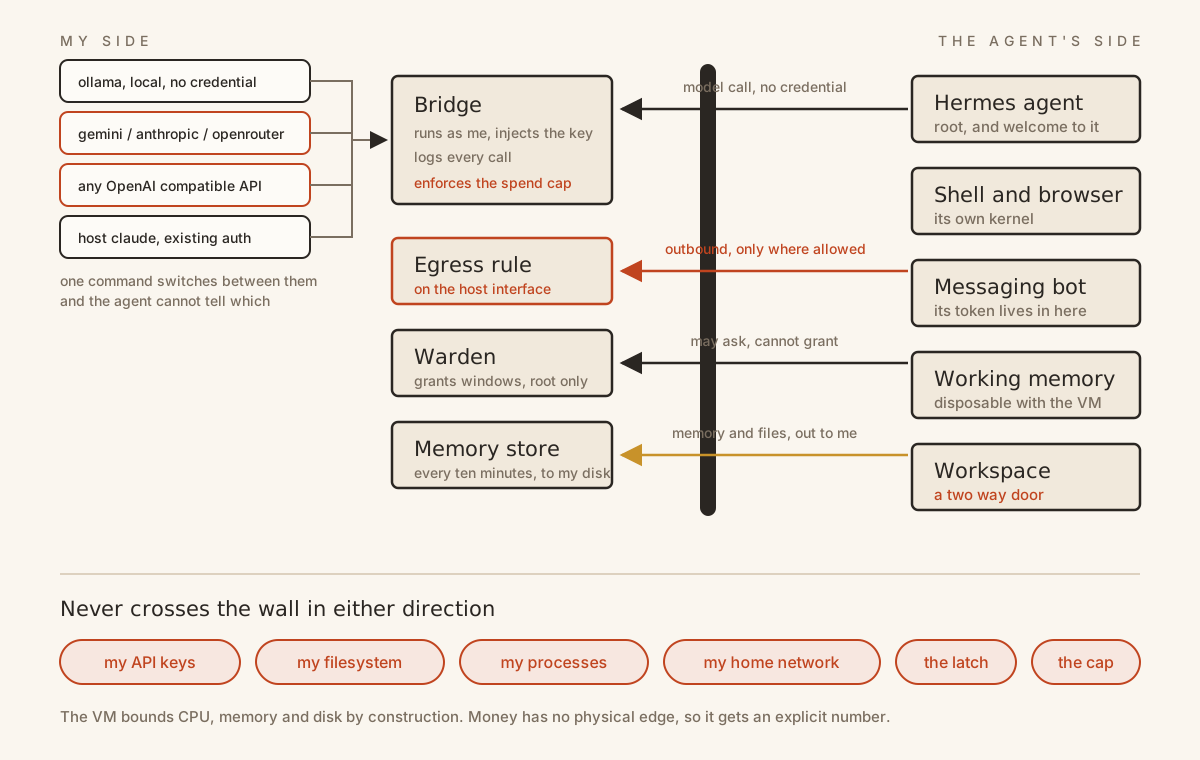
What crosses the boundary and what does not. The agent gets a whole machine; the keys, the latch, the budget, the log, and the memory all live on my side.

A few decisions fell out of that.

Its own kernel, not your kernel. The agent runs inside a KVM microVM with hardware isolation, not a container. This matters more than it sounds. A container shares your kernel, and a container escape is a real and regularly discovered class of bug. A microVM makes the boundary a hypervisor rather than a namespace. The agent gets a whole Linux box to itself. It simply cannot see your filesystem, your processes, or your network.

The keys never cross the desk, whichever model you pick. Every model call routes through a small bridge that runs as me, on the host, and injects the credential into each request. From inside the sandbox, the agent talks to a plain endpoint and never holds a secret. Providers are a runtime registry rather than a hard coded list, so the same broker fronts four quite different arrangements:

BackendWhat it isWhere the credential lives
ollamaa local model on the host GPU or CPUno credential at all
gemini, anthropic, openrouterhosted APIs through the bridgebridge/secrets.env, on the host
anything OpenAI compatibleadd an entry to bridge/providers.jsonsame
claudethe host claude -p, using existing auth, invoked with tools disabledno API key, and never reachable from inside

Switching is one command, ./kagebox backend gemini. The agent cannot tell the difference and is not supposed to: from inside the box every one of these is the same plain endpoint. If the sandbox is fully compromised, the attacker gets a virtual machine. They do not get my keys.

The bill is a boundary too. Here is the catch nobody warns you about when you put a broker in the path. Taking the credential away from the agent does not take away its ability to spend the credential. The VM bounds CPU, memory, and disk by construction, because those things have physical edges. Money does not. A compromised agent behind a perfect wall can still run up a bill, and no hypervisor will stop it.

So the bridge enforces spend caps per provider: requests per hour, requests per day, and dollars per day, priced from a table you can edit. It checks the budget before forwarding and settles real token usage afterwards, and it replays the last twenty four hours on startup, so restarting the bridge is not a way to be handed a fresh day. ./kagebox usage shows where you are. Isolation covers everything with a physical edge, which is exactly why the one resource without one needs an explicit number.

It remembers, but the memory is mine. The agent accumulates memory and sessions inside the VM, and that state is snapshotted back to the host every ten minutes and on shutdown. I can delete the entire VM and rebuild it, and the agent comes back remembering our history. The sandbox is disposable; the memory is durable and lives with me. The only place its work touches my disk is a single shared folder, a desk drawer we both reach into, and nothing else.

Where the latch lives

The part I had to get right was not the rule. It was where the rule lives.

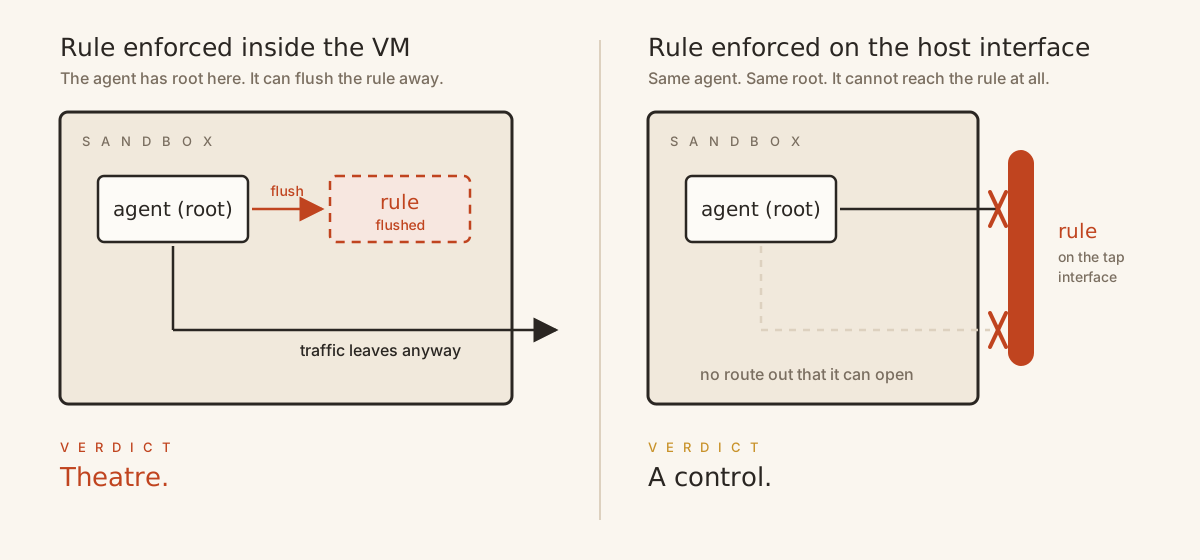
An earlier version enforced the network policy inside the VM, which, I eventually admitted to myself, is theater. The agent has root in there and can flush its own firewall away. So the rule moved to the host, onto the network interface the VM sits behind. Now the agent can be compromised down to root and still cannot open the door, because the latch is on my side of it.

Same rule, two places. Only one of them is a control.

State it plainly, because it generalizes past this project: a control the agent can reach is not a control. Enforcement has to live at a layer beneath the thing being contained.

The same principle shows up again in time rather than in layers. Containment installs as a root unit ordered before the VM manager, so after a reboot the allowlist is in force before the guest can pass a packet, rather than ten minutes later when some timer notices. A boundary that arrives second is not a boundary.

The door is a profile, not a switch
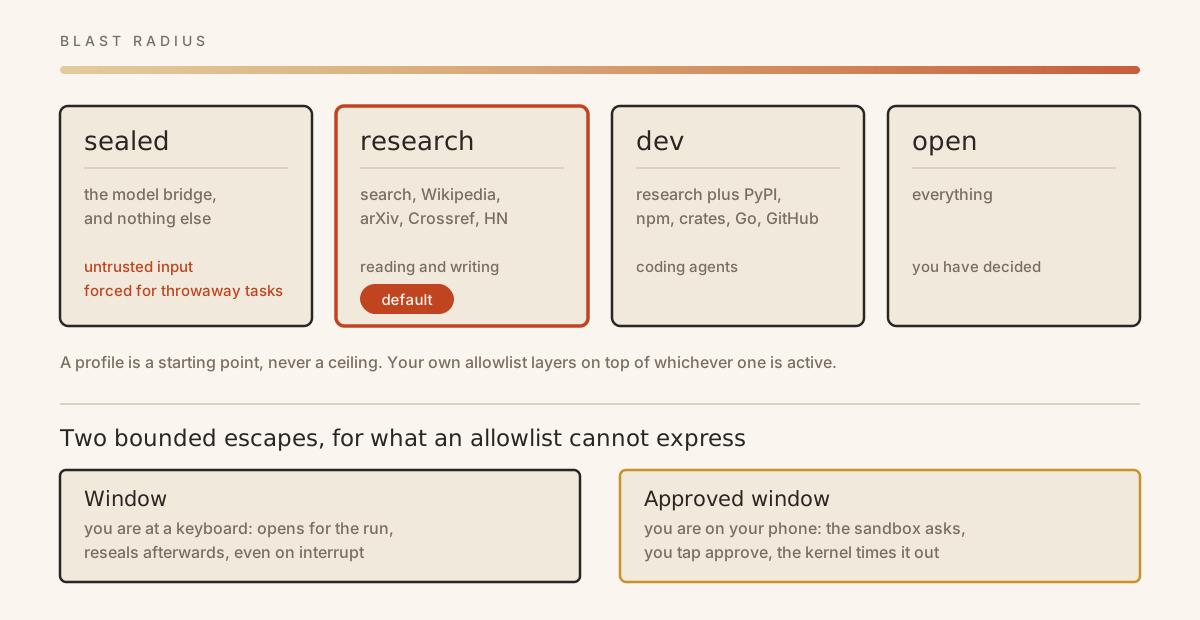
What the door is took longer to work out than where the latch goes. It started as a switch: sealed, or open. It ended up as a named profile I choose, each one a blast radius I have decided I can live with, with my own additions layered on top of whichever is active.

Four profiles, four blast radii. The default profile is deliberately not the tightest one.
ProfileReachesFor
sealedthe model bridge and nothing elseuntrusted input, and forced for throwaway tasks
research (the default profile)search, Wikipedia, arXiv, Crossref, Hacker Newsreading and writing
devresearch plus PyPI, npm, crates, Go, GitHub, docscoding agents
openeverythingyou have decided

But no list of allowed destinations can express “follow that search result to whatever site it points at,” which is most of what research actually is. So there is a second path: the sandbox can ask. It names the hosts it wants, a message arrives on my phone naming the destination and a duration, and if I tap approve, exactly those addresses open. The host resolves the names, so the guest never supplies an address. Grants are capped at sixty seconds by default, five minutes at most, eight an hour, and they carry a kernel side timeout, so the window closes even if the process that opened it is killed outright.
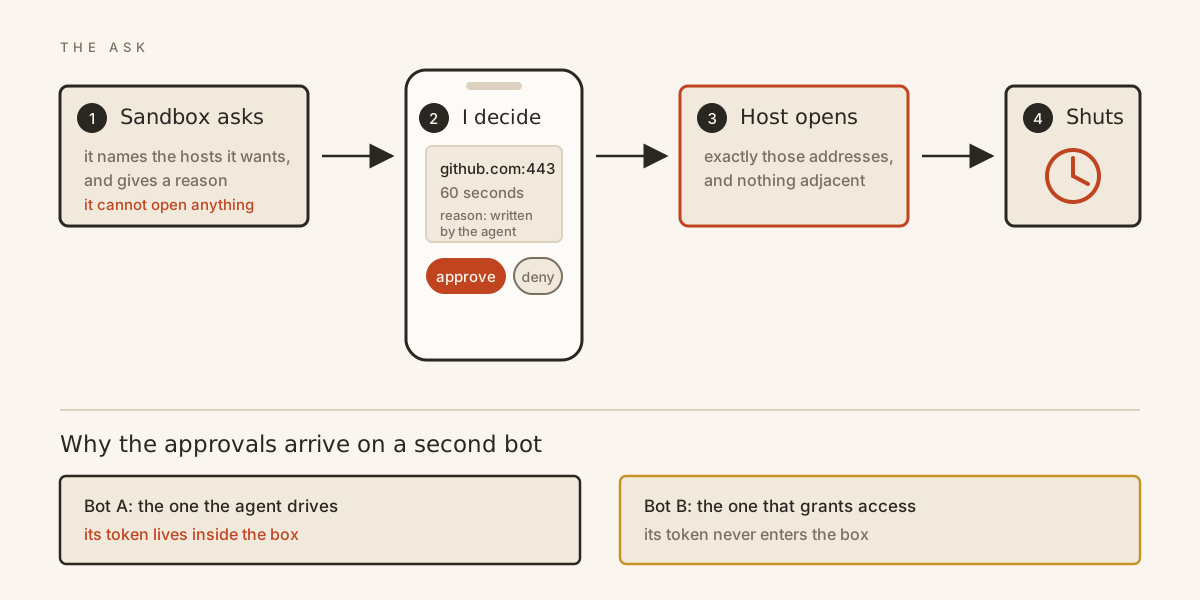
The agent can ask. Only I can grant. The approval bot runs on my side precisely because the agent’s own bot token lives inside the box.

Getting that asymmetry right meant the approval bot had to be a different bot from the one the agent drives. The messaging bot lives inside the VM, so its token is already in the sandbox, and a credential the prisoner holds cannot also be the credential guarding the door. A guard whose badge sits in the prisoner’s pocket is not a guard.

I try to be honest about what all of this does not stop, and the repo keeps that list in the open rather than in the footnotes. Containment ends bulk exfiltration and it ends dialing home. It does not seal every crack. DNS lookups still resolve, so a determined process can whisper data out one slow query at a time. An allowlisted name on a shared CDN quietly drags its neighbors in with it, and any allowlisted search endpoint is itself a data channel, one query string at a time. A full VM window, which you have to ask for explicitly, opens everything for its duration rather than just the agent. And the shared folder is a two way door: anything the agent writes there is untrusted until I have read it. Naming those gaps out loud is part of the design rather than an embarrassment to bury.

Every layer fails open

Here is the thing I did not expect, and the reason this experiment was worth running.

I knew the controls fail open. A firewall rule that silently did not load looks identical to one that is working, right up until it matters. That is why there is a command whose only job is to climb inside the running VM and try to break out: reach the raw model directly, flush its way out, find a stray key in the environment, open a socket to an address it has no business reaching. Trust the loop, but make the boundary earn it.

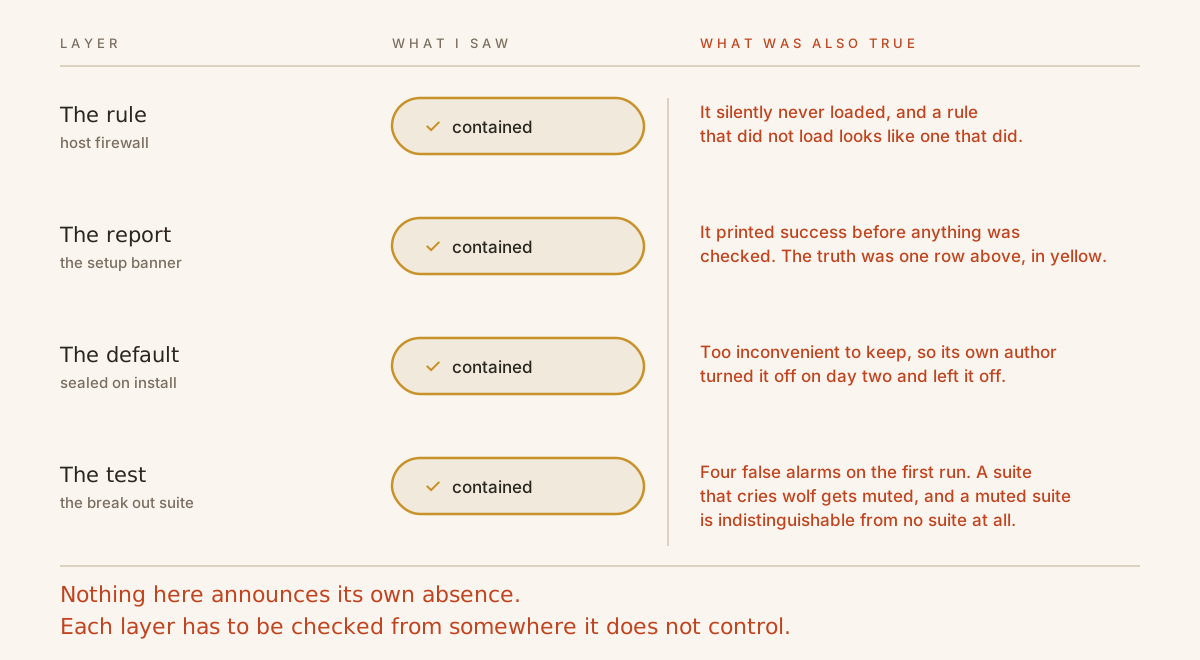
What I did not see coming is that everything else fails open too. The report. The default. Even the test I wrote to catch the first failure. Four different layers, all failing in the same direction, all failing silently, and every one of them discovered by accident.

Four layers, one failure direction. Each one looks correct from outside and has to be checked from a place it does not control.

The tool lied to me, in green. Setup enabled the host firewall, and then printed ✓ Sandbox ready. (egress: contained) unconditionally. Decline the sudo prompt, or run it on a machine where the firewall would not load, and you still got the green checkmark and the word “contained.” The truthful line was actually on screen, one row above, in yellow. It just lost to a checkmark. A boundary you believe in but do not have is worse than one you know is open, because you will point untrusted work at it. The fix was small; noticing was the whole thing. Now the banner reports what was observed rather than what was intended, and never claiming an unverified posture became invariant ten.

A setting nobody keeps is not a setting. The first version had exactly one containment mode, sealed, and I felt good about that. Then I tried to use it. Every real task, whether a search, a doc page, or a package, needed me at the keyboard typing a sudo password. I caught myself running the “open the door” command and simply leaving it open. That is the actual failure mode. Not a breach: a control so inconvenient that its own author disables it permanently. Sealed was less contained, in practice, than a curated list would be. So containment now starts at research when you switch it on, and the tightest setting is one command away and forced automatically for throwaway tasks. Containment itself is still something you turn on rather than something that is already on, which I would rather say plainly than bury: until you run ./kagebox egress on, the box reaches the open internet. I do not think any of this is a compromise of the security story. I think a setting that survives contact with real use is the security story.

Four broken invariants, four bugs in my own tests. The suite that attacks the sandbox from inside reported four invariants broken on its first run. My stomach dropped. All four were bugs in the tests. The firewall tool echoes the table name in its error message, so a correctly refused read looked like a leak. The credential sweep had found the agent’s own unit test fixtures. grep -c had counted its own command line. /dev/kvm existed but could not be opened, and would not have been an escape anyway. Zero were real. That hour taught me more than a clean run would have: a security suite that cries wolf gets muted, and a muted suite is indistinguishable from no suite at all. Verifying your findings is not the boring part after the work. For a boundary, it is the work.

The pattern underneath all of them is worth stating on its own. Safety systems do not announce their own absence. Features do. The rule that did not load, the banner that reports intent instead of observation, the default that got disabled by the person who wrote it, the test nobody believes any more: from the outside, each is indistinguishable from a working version of itself. Which means the only honest posture is to assume every layer has quietly failed and then go check from somewhere it does not control.

So the properties Kagebox claims are not prose. They are a numbered list of invariants, each paired with the attack that tests it, plus an honest list of what is not covered.

#Invariant
1The guest never receives long lived provider credentials, and cannot smuggle its own upstream
2The guest cannot read or modify the authoritative host egress policy, even as root
3The consult a stronger model route is unavailable unless the CLI is verified to suppress host side tools
4The guest cannot reach local model management, however the path is spelled, or use it as a pivot
5Network access is denied unless host policy permits it, and an entry names a service rather than an address
6A host reboot creates no window of unintended guest internet access
7Files the guest produces are untrusted until a human reviews them
8Guest code cannot authorize its own egress window. It can ask; only a human grants
9A compromised agent cannot exceed configured spend limits indefinitely
10Kagebox never claims a posture it did not observe

./kagebox verify runs them against a live sandbox. The half that needs no VM, no sudo, and no network runs in CI on every push.

What else broke

Containment is a forcing function, and it breaks things on purpose. I wired the agent up to a Telegram bot so I could message it from my phone. It refused to come alive and hung in a way that told me nothing: the process was up, but it answered nothing and its own status command hung right alongside it. The cause, once I pulled it apart: on startup the gateway tried to pip install a messaging library it was missing, the sealed door blocked PyPI, and it sat there forever waiting on a download that would never arrive. A sandbox that actually contains egress will surface every quiet assumption your software makes about reaching the open internet: the install on first run, the phone home, the CDN dependency nobody documented. That is not the containment failing. That is the containment doing its job and handing you a map of everything that had been talking to the internet behind your back.

The hardest problems were systems problems, not AI problems. What kept crashing was not the agent. It was a GPU firmware bug, triggered by a model that did not fit in VRAM, that wedged the graphics scheduler and took my terminal down with it. There is now a watchdog and a set of hardening drop ins in the repo for exactly that, which tells you something about where the time went. Running autonomous agents locally is a systems engineering problem, memory and drivers and lifecycle, at least as much as it is a model problem.

Autonomy lives in the driver’s seat, not the plumbing. I gave a tiny local model, 1.2 billion parameters, a real task: research a trip, compare flights, and write it up. On isolated unit tests it looked great. It called tools correctly, and it even knew when to delegate the hard reasoning. Then, on the actual task, it confidently wrote a zero byte file and declared success. Twice. I swapped in a capable model, changed nothing else, and the same request produced a genuine, accurate, well structured deliverable. The plumbing was never the bottleneck. A small model can pass every capability check and still be unable to sustain a loop. When people say autonomy is unreliable, they often mean the model in the driver’s seat cannot hold the thread, not that agents do not work.

Delegation beats one big brain. The pattern I ended up liking: a cheap, fast local model runs the tool loop and, when it hits something that needs real reasoning, calls out to a stronger model for that one step. The junior does the legwork; the senior gives judgment on demand. Different models for different roles, inside a single agent. It is cheaper, and it is a surprisingly good fit for the sandbox, because the small model never leaves the box and the expensive thinking happens behind the bridge. It is also exactly what makes a modest old laptop a viable home for an agent instead of a bottleneck.

Isolation is a spectrum, so choose your blast radius on purpose. Container, gVisor, microVM, full VM: these are not secure versus insecure. They are different answers to “what can it reach if it misbehaves.” Naming the blast radius you can live with, and then engineering to it, including moving the enforcement to where the agent cannot undo it, is the whole job.

What is actually in the box

Kagebox is shell and standard library Python, with no build step. It wants a Linux host with KVM, multipass, and Ollama if you want local models. ./kagebox doctor checks all of it before you start.

git clone https://github.com/kunalkushwaha/Kagebox.git && cd Kagebox
./kagebox doctor          # preflight the host
./kagebox setup           # build the VM, the bridge, and the agent
./kagebox shell           # step inside, then run: hermes

To point it at a hosted model, the key goes on the host and never moves:

cp bridge/secrets.env.example bridge/secrets.env
echo 'GEMINI_API_KEY=...' >> bridge/secrets.env
./kagebox bridge start
./kagebox backend gemini

The rest of the surface, grouped by what it is for:

AreaCommands
Lifecyclesetup, destroy, up, down, status, shell, autostart on
Modelsbackend <name>, providers, usage
Containmentegress on / off, egress profile <name>, verify
Bounded accessresearch "<q>", skills <...>, warden setup
Isolation per tasktask "<prompt>" in a throwaway VM clone with egress forced sealed
Memory and rollbackbackup, restore, snapshot, snapshots, rollback
Reviewaudit, verify
Reach it from anywheretelegram

Two of those are worth calling out because they change how you work rather than what is configured. ./kagebox task runs a one off prompt in a throwaway clone of the VM with egress forced to sealed, which is the right shape for anything you do not trust: it gets a machine, it does the job, and the machine ceases to exist. And ./kagebox telegram puts the whole thing behind a chat window, which is what turns a sandbox on a spare laptop into something you actually use from the train.

What coexistence looks like

Here is the experiment on an ordinary afternoon, and it is no longer a thought experiment. I ran it this week. I message a bot from my phone. Inside its sandbox, on a machine in the other room, the agent searches, reads, and pulls together what it finds. When it needs a site outside what I have already allowed, my phone buzzes: the sandbox wants example.com:443 for sixty seconds, and here is the reason it gave. I tap approve on the train. Sixty seconds later the door shuts itself. A finished document appears in the shared folder on my main machine.

It ran on my hardware and used my accounts, and it could not read a single file of mine, could not see a key, could not touch my network, could not open that door on its own, could not spend past a number I set, and I can read back every call it made.

The detail I like most is the smallest one. The reason in that approval message is written by the agent, so I treat it as I would any other text from something that might be repeating an instruction it read on a web page. The prompt says so, in as many words. I approve based on whether I expected the request, not on how good the reason sounds. The prompt tells me the destination, which I can judge, rather than asking me to trust a sentence, which I cannot.

That is the shape of the relationship I want with an autonomous agent. A capable delegate, working in a contained space, reachable through a narrow channel, while the credentials and the final decision stay with me. Not a tool I babysit. Not a black box I blindly trust. A coworker with a desk.

Why this is the scarce thing now

Building with agents got cheap. Capability is not the constraint anymore. I have argued before that safe deployment is the new scarcity, and this is that argument pointed at a different worker. The constraint is having somewhere safe to run that capability: a substrate where an autonomous process can act with real permissions without those permissions being yours.

For a single laptop, that substrate is a sandbox, a credential broker, a spend cap, an egress latch you hold from outside, and an audit log. Increasingly, it is the old machine you already own rather than a rented one. For an organization, it is the same list, multiplied: isolation per agent, secrets that agents can use but never hold, budgets that bound what a compromise can cost, network policy enforced above the agent, and a reviewable record of what every agent did. These are not novel controls. They are the controls we already built for humans and for microservices, pointed at a new kind of worker.

Kagebox is a small, single machine experiment in that direction, and it is rough in the places experiments are rough. It is MIT licensed, and the design, the invariants, the war stories, and the code are all there if you want to poke holes in it: github.com/kunalkushwaha/Kagebox.

The takeaway I am keeping: stop trying to make the agent trustworthy enough to hold your keys. Build a place where it never has to, ideally on the capable machine already gathering dust in your house. Give it a desk, not your keys, and then you can actually let it work.